
Home / PIRL reporting
PIRL Pilot by OutcomesPath
Check your PIRL file before WIPS does
Drop the file you would upload to WIPS. In one pass you see the format errors, bad codes, duplicates, and logic errors that would send it back, in plain English, with a fix list by participant. You also see outcomes you earned but never reported. Your file stays in your browser.
See PIRL Pilot in under two minutes
Watch a file go from WIPS errors to a fix list, outcomes to claim, and a performance preview.
What PIRL Pilot checks
The same kinds of checks WIPS runs, explained so the person fixing the record understands them.
Format
Right number of columns, no header row, no blank lines, no stray spaces, and no leading zeros lost by Excel.
Valid values
Dates as YYYYMMDD, codes from the DOL list, numbers in numeric fields, nothing too long.
Duplicates
The same person twice, the same OBS number twice, and overlapping enrollments.
Logical rules
748 of DOL's own cross-field rules, such as: if there is an exit date, there must be an exit reason.
Outcomes to claim
Exiters with no second-quarter employment recorded, employed exiters with no wages, training with no credential, skill gains never written down.
Performance preview
Your employment rates, median earnings, credential rate, and measurable skill gains before the quarter closes.
WIPS already rejected your file?
Export the errors from Edit Check Results in WIPS and drop that export with the PIRL file you uploaded. PIRL Pilot matches every error to the record and column, tells you what it means, and shows what WIPS has not reached yet, so the next upload is the last one.
Pricing
PIRL Pilot is included in the OutcomesPath Team, Pro, School, College, and Enterprise plans. On its own it is $199 a month (three-month minimum, then month to month with 30 days' notice), or $2,149 a year (10 percent off). From April 1, 2027, new clients pay $239 a month or $2,581 a year. On its own, PIRL Pilot covers up to 7 staff users and 1,000 participants in the quarter you report. Each added 1,000 participants is $49 a month, and when every workforce board in a state signs on, each board gets 10% off. Sign up online. Pay by check, ACH bank transfer, or credit card; a purchase order number can go on the order.
Built for the work before the file exists
PIRL is a data capture problem more than a reporting problem. PIRL Pilot also has a toolkit that helps staff pick the right code the first time, map exports from any case management system or spreadsheet into PIRL, and see follow-up deadlines before a window closes.
New this month
Added in November 2026 and included in every plan, with nothing extra to buy. See what your program would save.
Data API
Read-only keys connect your data warehouse or state system. You choose what each key can read and turn it off any time.
Live funder links
Send a funder or board a live results page with totals only. No names, small numbers hidden, and you turn it off any time.
Grant and funding tracking
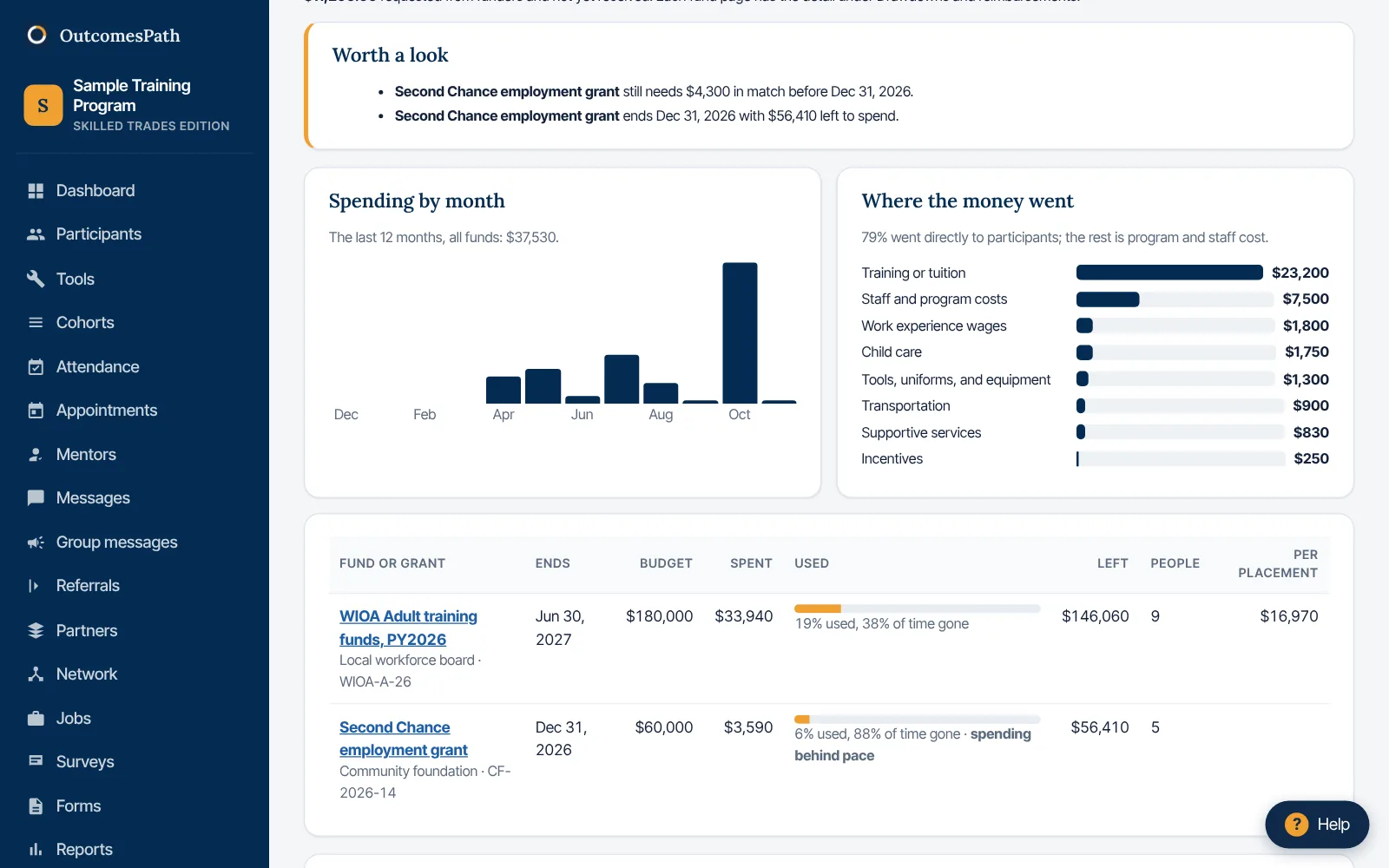
Budgets, spending by person and category, cost per participant and per placement, and a warning when spending runs ahead of or behind pace.
Workforce Pell outcomes
Completion and job placement for each short-term program against your state's targets, with a student list ready for your state report.
Import your data in minutes
Import your old system's export yourself in minutes. Columns are matched for you, every row is checked first, and an import can be undone.
The OutcomesPath Network
Refer people to other programs that use OutcomesPath, with the person's consent, and see when they are accepted and served.
Also new this fall
Added in November 2026 and included in every plan. SAML single sign-on comes with Enterprise plans.
Retention reminders
The dashboard lists who is due for the 2nd and 4th quarter after exit follow-up, and keeps listing them until it is recorded.
Service plans
Goals, steps, and due dates on every case file. The participant reads the plan in the portal and agrees by typing their name.
Documents and signed releases
Upload IDs, resumes, and certificates to the case file, and get releases and consent forms signed on screen, with the time recorded.
Spanish for staff and participants
Your participants switch their portal to Spanish with one tap, and each staff member can switch their own screens to Spanish too.
Single sign-on
Staff sign in with Google or Microsoft, or with your own SAML sign-on on Enterprise plans.
Ready for procurement
Security questionnaire answers, an accessibility report (VPAT), and a sample data privacy agreement. Download the packet.
New: grant money beside QuickBooks
See what every grant is doing
Keep QuickBooks as your book of record. OutcomesPath tracks each grant's budget, spending, match, and outcomes, and hands your fiscal team the reports funders and auditors ask for.
- Import spending from QuickBooks or any accounting system with an Excel export
- Budget lines, match, indirect costs, and caps per person for every grant
- Caseworkers ask for payments; an admin approves them with the receipt
- Funder report reminders, drawdowns, and subawards with partner invoices
- 22 standard financial reports and a one-click grant closeout packet
PIRL questions
What is a PIRL file?
PIRL stands for Participant Individual Record Layout. It is the participant-level file workforce programs upload to the Department of Labor through WIPS each quarter, one row per participant, with the elements defined in ETA-9172.
Why does WIPS reject a PIRL file?
Most rejections come from a few causes: the wrong number of columns, dates not written as YYYYMMDD, codes that are not on the DOL list, leading zeros lost when the file was opened in Excel, duplicate records, and cross-field logic, such as an exit date with no exit reason.
Does my participant data leave my computer?
No. PIRL Pilot checks the file inside your browser tab. The file is not uploaded to a server.
Which rules does PIRL Pilot check?
Format, valid values, duplicates, and 748 of DOL's cross-field logical rules. Element definitions and code lists come from the DOL-only PIRL (ETA-9172, 2.6.2025), and the logical rules come from the WIPS Logical Validation specification for PIRL 2025. Every rule is listed in the open with its source.
Can it read the WIPS error export?
Yes. In WIPS, open Edit Check Results and click Export Errors. Drop that export with the PIRL file you uploaded, and PIRL Pilot ties every error to the record and column, explains it in plain English, and shows the errors WIPS has not reached yet.
Is PIRL Pilot part of OutcomesPath?
Yes. PIRL reporting is built into OutcomesPath, so staff check the file in the same place they manage cases.
How much does PIRL Pilot cost?
PIRL Pilot is included in the OutcomesPath Team, Pro, School, College, and Enterprise plans. On its own it is $199 a month, or $2,149 a year, which is 10 percent off. The monthly plan has a three-month minimum. From April 1, 2027, new clients pay $239 a month or $2,581 a year. On its own, PIRL Pilot covers up to 7 staff users and 1,000 participants in the quarter you report. Each added 1,000 participants is $49 a month, and when every workforce board in a state signs on, each board gets 10% off.
Case management for workforce boardsSkills Library: 76 life skills coursesFor colleges and training providers
See it with your own program in mind
Every new organization gets a free pilot. Ask for demo access and we reply by email, usually the same business day, with your links.