
Home / Alumni Network
New: Alumni Network
Stay in touch with the people who finish
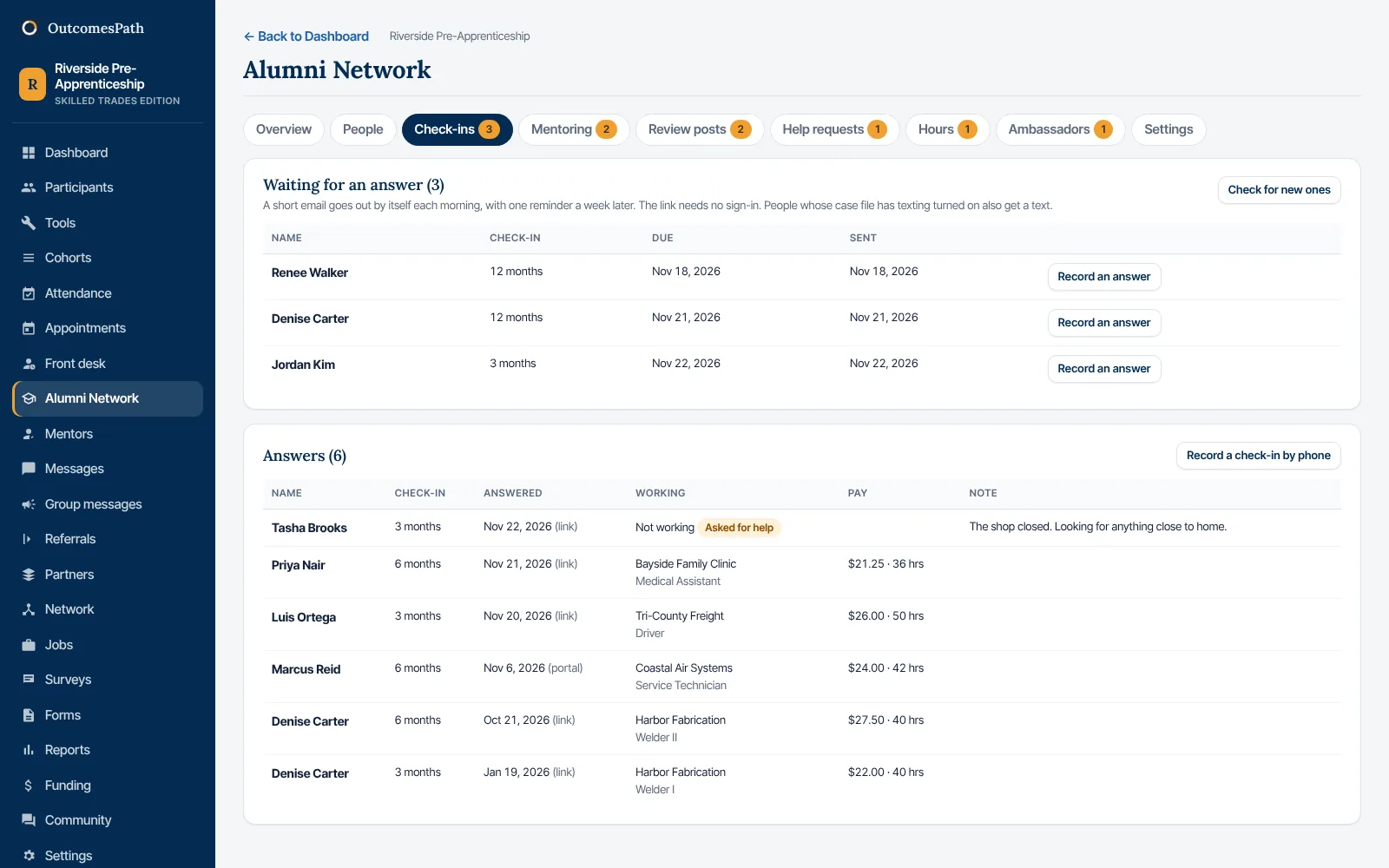
Most programs lose track of people the day they complete. The Alumni Network keeps them close: a one-minute check-in on how work is going, one button when they need help again, and a safe way to give back to the people coming up behind them.
Watch the overview
A one-minute look at check-ins, follow-up outcomes, help alerts, and mentoring. Running a college or career program? Watch the college version.
1:13 · Captions available in the player
Built for outcomes, not fundraising
Most alumni software is built to raise money. This one is built for the people who have to prove their program works, and who want graduates to keep doing well.
Outcome check-ins that get answered
At 3, 6 and 12 months after finishing, each person gets a short email with a private link. A few questions, one minute, no sign-in. Working or not, where, and what it pays. People with texting turned on get a text too.
A way back in
Lost a job. Hours cut. Ready for the next step. One button, I need help again, reaches your staff the same day, and the request sits on a list until someone closes it.
Questions and answers
A new participant asks what to bring on the first day. Three people who have been there answer. Your staff read everything before anyone else sees it.
Thirty-minute mentoring
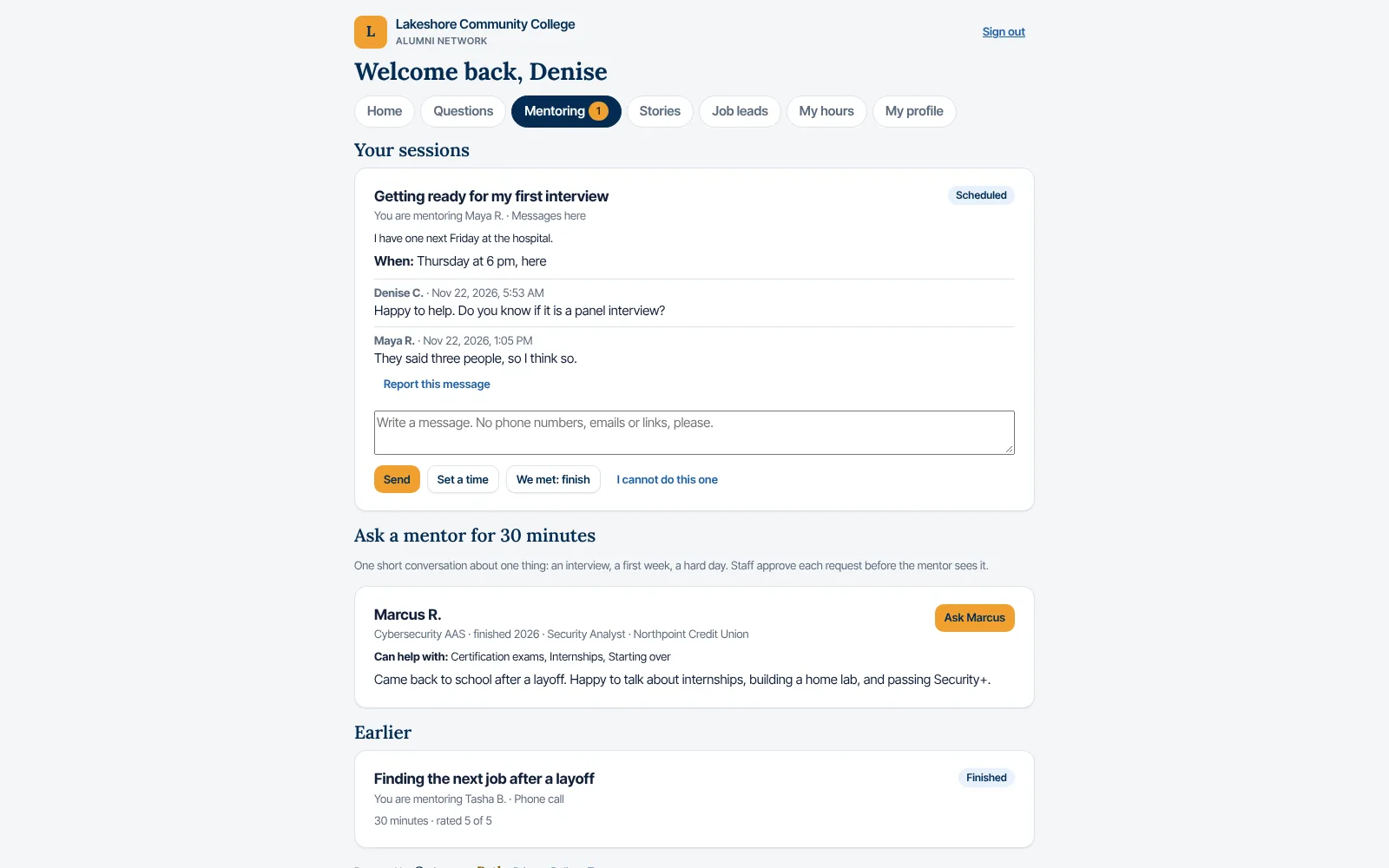
One short conversation about one thing: an interview, a first week, a hard day. No long commitment, so more alumni say yes. Finished sessions are logged as volunteer time.
Stories and job leads
Alumni write their own success stories and tell you whether you may share them outside the network. They pass along openings where they work, so your next class hears about jobs first.
Volunteer hours for match
Every mentoring session and every logged hour adds up. Set the hourly value your funder accepts and see what your alumni gave, ready for an in-kind match report.
Safe by design
Putting graduates in touch with current participants is only worth doing if it is safe. These are the rules, and they are enforced by the software.
Staff approve every mentor
An alum offers to mentor and agrees to written rules. Nobody appears in the mentor list until your staff say yes. You can record the date of a background check.
Staff approve every match
The mentor does not see a request, and no message can be sent, until staff approve it. You can relax this for adult programs. It is always on for minors and reentry.
Conversations stay inside
Phone numbers, email addresses, links and social media names are blocked in messages and posts. If a call or meeting makes sense, staff set it up.
Report and review
Either person can report a message with one tap. It is hidden at once and goes to staff, who can read every conversation at any time.
Minors
Turn on the under-18 setting and mentoring stays in written messages only, with staff approval on every request.
Reentry programs
Staff confirm that contact is allowed under both people's supervision conditions before each match is approved.
Alumni engagement for community colleges and career programs
Your graduates are the proof that a program works, and the people your current students most want to hear from. The Colleges and CTE edition uses student wording throughout.
Graduate outcomes you can report
Check-ins at 3, 6 and 12 months show who is employed, where, and at what wage, by program. Use it for placement rates, Perkins and Workforce Pell follow-up, and accreditation reviews.
Students ask graduates
A nursing student asks a working nurse about clinicals. A cybersecurity student asks whether a certification is worth it. Career services approves each match and can read every message.
Admissions ambassadors
Choose a few graduates and link one public page from your website. Prospective students read each story by first name and send a question. It comes to your staff, a graduate writes the reply, and you send it.
Job leads from inside
Graduates post openings where they work, so your next class hears about them first. Every lead is reviewed by staff before students see it.
Watch: the Alumni Network for colleges
1:09 · Captions available in the player
Who uses it
Any program that wants to know what happened after someone finished, and wants graduates to help the next person.
Colleges and CTE
Graduate outcomes by program, student-to-graduate mentoring, and admissions ambassadors.
Workforce boards
Follow-up after exit for employment and wages, with a way back when a job ends.
Nonprofits
Outcomes funders ask for, peer mentoring, and volunteer hours counted as match.
Reentry programs
Peer mentors who have been home and stayed home, with a supervision check on every match.
Youth programs
Written-only mentoring with staff approval when anyone is under 18.
Skilled trades training
Journey workers answer questions from the next class and share job leads from their shops.
Call it what you call it
Alumni Network, Graduate Network, Peer Mentor Network, Completer Community. Type the name your people use and it shows that way everywhere they look. A small Give back button can show your giving email address for alumni who ask how to donate. That is the only fundraising feature, and you can leave it off.
Pricing
Priced by how many alumni you keep active, meaning invited or joined. Alumni never count against your participant limit. Included at no charge during a free pilot. Pay for 12 months in advance and take 10% off.
Added to an OutcomesPath plan
Up to 1,500 alumni
Check-ins feed your case files and reports. Participants reach alumni from their own portal.
Unlimited alumni
Everything above with no limit on alumni, for larger programs and multi-site organizations.
On its own
Up to 1,500 alumni
The full Alumni Network without case management. Load your alumni from a spreadsheet and invite them.
Up to 5,000 alumni
Everything above, for colleges and larger programs.
Unlimited alumni
Everything above with no limit on alumni.
Check-in texts use the texting add-on and go only to people who agreed to texts. The Alumni Network is added to your order in writing. Email support@outcomespath.com and we will add it to your order.
Common questions
What is the Alumni Network?
A place for the people who finished your program. They answer short outcome check-ins, ask for help again with one button, answer questions from current participants, mentor, share stories and job leads, and log volunteer hours. Your staff approve what is posted.
Do we need OutcomesPath case management to use it?
No. You can add it to any OutcomesPath plan, or buy it on its own. On its own, you load your alumni from a spreadsheet and invite them.
Is there a version for colleges?
Yes. The Colleges and CTE edition uses student wording, reports graduate outcomes by program, lets current students ask graduates for a short conversation that career services approves, and adds a public admissions ambassador page.
How do alumni sign in?
With their email. They ask for a sign-in link and open it. There is no password to remember and no app to install.
How is mentoring kept safe?
Your staff approve every mentor, and every mentor agrees to written rules. Staff approve each request before the mentor sees it. Messages stay inside the network. Phone numbers, emails and links are blocked. Either person can report a message, and staff can read every conversation. Programs with minors are limited to written messages. Reentry programs confirm supervision conditions on each match.
Do alumni count against our participant limit?
No. Alumni are counted on their own, by how many you keep active.
Does it handle donations?
No. It is built for outcomes and for giving back time. If you want, a small Give back button shows your giving email address. Nothing is charged in OutcomesPath.
See it with sample data
The demo has three sample organizations: a skilled trades program, a human services nonprofit, and a community college. Each opens as a staff member, a graduate, or a current student, so you can see all three sides in five minutes.